
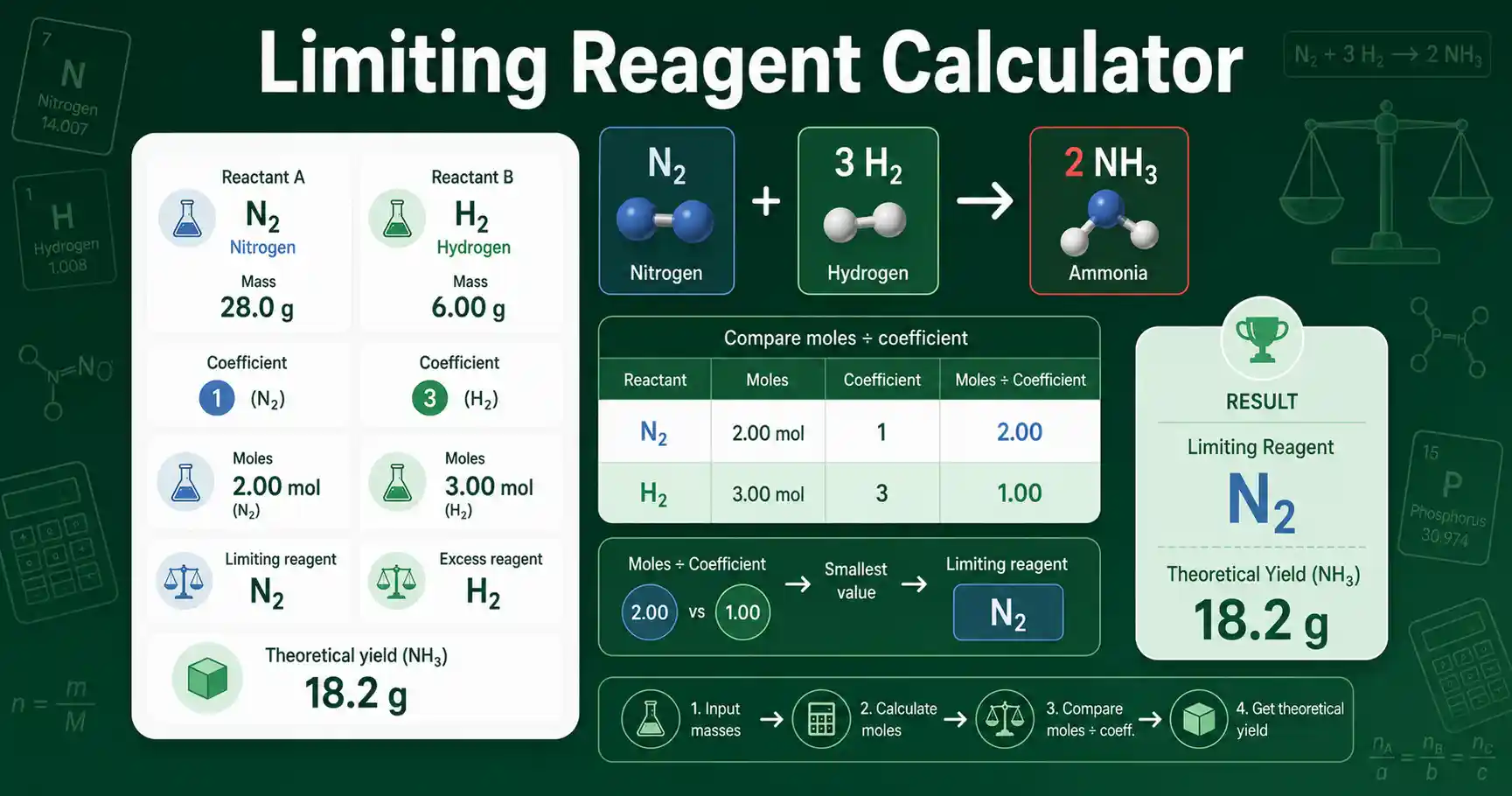
Limiting Reagent Calculator for stoichiometry problems
This Limiting Reagent Calculator identifies which reactant controls the amount of product in a chemical reaction. It is useful when two reactants are mixed in amounts that may not match the balanced equation ratio. The limiting reagent is the reactant that runs out first. The excess reagent is the reactant left over after the limiting reagent is consumed.
The calculator works from a balanced equation with two reactants and one product target. You enter the coefficient for each reactant, the amount of each reactant, and the product coefficient. If the reactants are entered in grams, the calculator uses molar mass to convert grams to moles. It then compares each reactant as moles divided by coefficient.
Use this tool for homework, classroom demonstrations, reaction-yield checks, and general chemistry learning. It helps students see that limiting reagent work is not based on the larger mass or the larger number of moles alone. It is based on the mole ratio required by the balanced equation. For later yield work, the Theoretical Yield Calculator can help focus directly on product mass.
The result is educational and assumes the balanced equation is correct. Real reactions may have incomplete conversion, side reactions, impurities, or loss during handling. Verify critical lab calculations independently before using them in real experiments.
How to use Limiting Reagent Calculator correctly
Start with a balanced chemical equation. Enter the formula or short name of reactant A and reactant B. Then enter their stoichiometric coefficients exactly as written in the equation. For example, in N2 + 3H2 → 2NH3, nitrogen has coefficient 1, hydrogen has coefficient 3, and ammonia has coefficient 2.
Enter each reactant amount in grams or moles. If you choose grams, enter the molar mass in g/mol for that reactant. If you choose moles, molar mass is optional, but adding it lets the calculator estimate leftover excess mass. Enter the product coefficient and product molar mass when you want theoretical yield in grams.
Advanced purity mode adjusts the available moles when a reactant sample is not fully pure. A 90% pure reactant means only 90% of the weighed mass is treated as active reactant. Leave purity at 100% for normal textbook problems unless the problem gives a purity value. Do not use purity correction to represent percent yield because those are different concepts.
If you need to calculate percent yield from an actual product mass after finding the theoretical yield, use the Percent Yield Calculator. Limiting reagent tells the maximum possible product. Percent yield compares the real product amount against that maximum.
Limiting Reagent Calculator formula and assumptions
The calculator first converts every reactant amount to moles. For mass input, moles equal grams divided by molar mass. For mole input, the entered mole value is used directly. If purity is entered, available moles are multiplied by purity divided by 100.
The reactant with the smaller reaction extent is the limiting reagent. The smaller extent tells how many full stoichiometric reaction units can occur. Theoretical product moles equal that smaller extent multiplied by the product coefficient. Product grams equal product moles multiplied by product molar mass.
OpenStax Chemistry describes limiting and excess reactants as a reaction-yield problem that requires comparing molar amounts with stoichiometric amounts from the balanced equation. This calculator follows that same mole-ratio method and shows the comparison table so the reasoning stays visible. The tool does not balance equations automatically, so the input coefficients must already be correct.
The method assumes one main reaction pathway and complete consumption of the limiting reagent. It does not model equilibrium, reaction kinetics, solubility limits, gas loss, or side products. It also does not decide whether a reaction is safe, practical, or chemically appropriate. It only performs the stoichiometric calculation entered by the user.
Limiting Reagent Calculator worked example
Consider the reaction N2 + 3H2 → 2NH3. Given values are 15.0 g N2, 10.0 g H2, molar mass of N2 = 28.014 g/mol, molar mass of H2 = 2.016 g/mol, and molar mass of NH3 = 17.031 g/mol. Nitrogen moles = 15.0 ÷ 28.014 = 0.535 mol. Hydrogen moles = 10.0 ÷ 2.016 = 4.96 mol.
The reaction extent for N2 is 0.535 ÷ 1 = 0.535. The reaction extent for H2 is 4.96 ÷ 3 = 1.65. The smaller value is 0.535, so N2 is the limiting reagent. Hydrogen is present in excess because its available amount is more than the equation needs for the nitrogen present.
Theoretical NH3 moles = 0.535 × 2 = 1.07 mol. Theoretical NH3 mass = 1.07 × 17.031 = 18.2 g. The interpretation is that 15.0 g of nitrogen can produce about 18.2 g of ammonia if the reaction follows the equation completely and no material is lost.
Limiting Reagent Calculator results explained
A limiting reagent result means that reactant gives the lowest moles-to-coefficient value. It does not always mean that reactant has the smallest mass. It also does not always mean that reactant has the smallest mole amount. A reactant with many moles can still be limiting if the balanced equation requires a much larger coefficient for it.
The theoretical product result is the maximum product predicted by stoichiometry. A real experiment can produce less because of incomplete reaction, transfer loss, evaporation, purification loss, or side reactions. The excess remaining result estimates how much of the non-limiting reactant is left after the limiting reagent is used up.
A stoichiometric tie means both reactants match the balanced equation ratio. In that case, neither reactant remains in excess under the ideal model. Small rounding differences can make a nearly exact ratio look slightly limiting, so use appropriate significant figures when reporting final answers.
Limiting Reagent Calculator mistakes to avoid
Do not compare grams directly. Stoichiometry uses moles because balanced equations describe particle ratios, not mass ratios. Convert grams to moles before comparing reactants. Do not forget coefficients, especially when the equation uses values such as 2, 3, or 5.
Do not enter an unbalanced equation. If the coefficients are wrong, the limiting reagent result will also be wrong. Do not use molecular mass for the wrong substance. For example, O2 has a molar mass near 32.00 g/mol, not 16.00 g/mol, because oxygen gas is diatomic.
Do not mix theoretical yield with actual yield. Theoretical yield comes from the limiting reagent calculation. Actual yield comes from a measured product amount. Percent yield needs both values, and it should not be entered as a purity correction in this tool.
Limiting Reagent Calculator use cases in chemistry
Students can use the calculator to check limiting reactant homework after writing a balanced equation. It shows each intermediate mole comparison, so learners can see why one reactant limits the product. Teachers can use it to demonstrate that mass, moles, coefficients, and product yield are connected but not interchangeable.
Lab workers can use the tool as a quick stoichiometry check before preparing a reaction worksheet or teaching example. Researchers can use it for first-pass mole-ratio planning in non-clinical educational contexts. The result should be reviewed against the actual reaction design, reagent purity, safety documentation, and experimental constraints before any real lab use.
Student questions about limiting reagent calculations
How do I find the limiting reagent?
Convert each reactant amount to moles, divide each mole amount by its balanced equation coefficient, and choose the smaller value. That smaller value shows which reactant runs out first.
Why does the calculator need molar mass?
Molar mass is needed when a reactant amount is entered in grams. The limiting reagent comparison must be made in moles because balanced equations describe mole ratios.
Can two reactants both be limiting?
If the entered amounts match the balanced equation ratio exactly, both reactants are consumed at the same time. The calculator calls this a stoichiometric tie, and no excess reagent remains in the ideal calculation.
External source: OpenStax Chemistry 2e section on reaction yields.