
Microbiology and cell culture calculator
MOI Calculator for Cell Culture
Calculate multiplicity of infection, required infectious units, and viral stock volume from target cells, desired MOI, and stock titer. Use it for educational planning, homework checks, and non-clinical lab math.
Cell culture math
Calculate MOI and viral stock volume
Enter your target cell number, desired MOI, and infectious stock titer. The calculator estimates the infectious units and the stock volume needed for a cell culture calculation.
Inputs
Use total target cells for one tube, dish, or well.
Results
The result uses infectious titer, not physical particle count.
Volume of the original stock that contains the required infectious units.
Formula: required infectious units = target viable cells × MOI. Stock volume = required infectious units ÷ stock titer.
MOI Calculator for infectious-unit planning
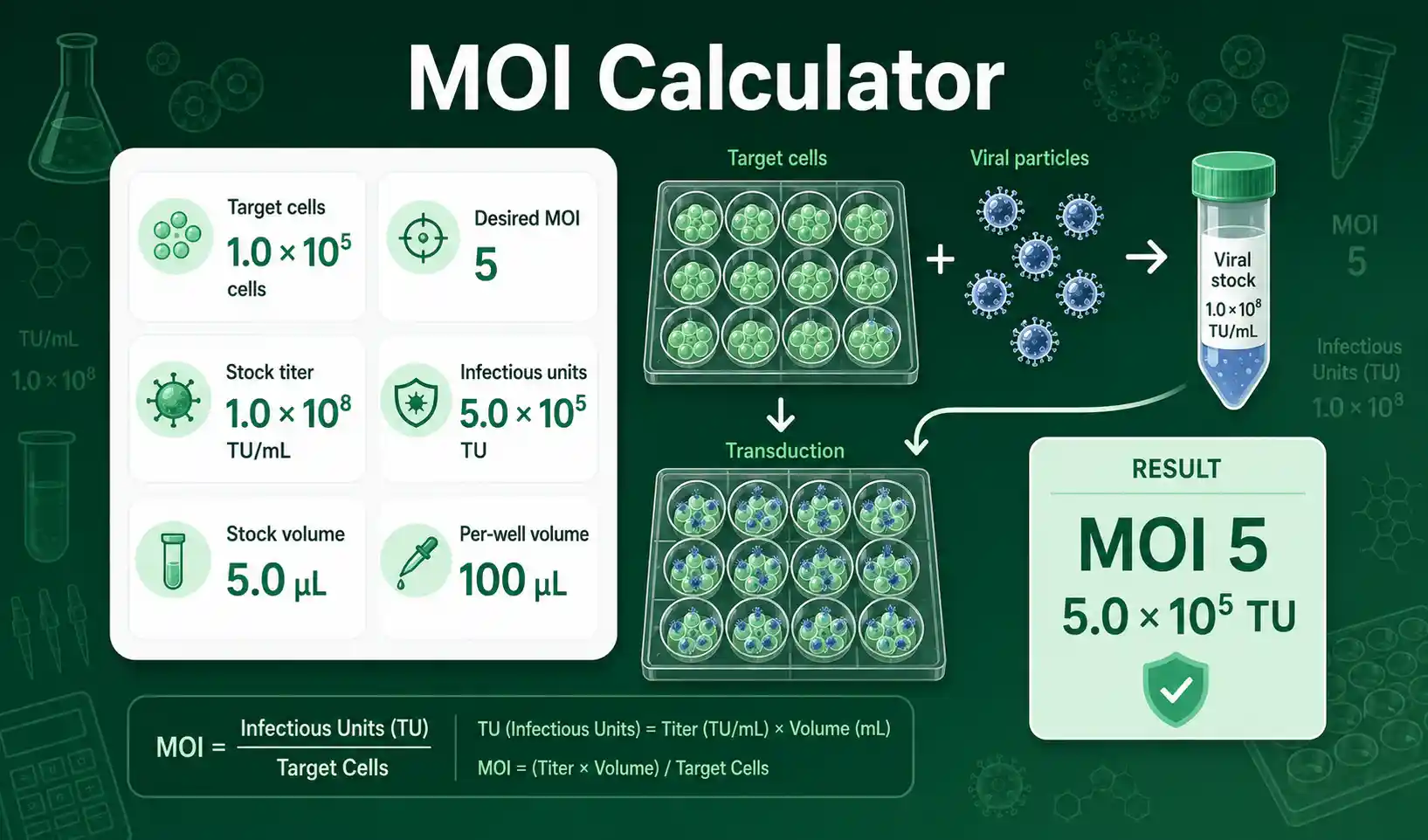
This MOI Calculator estimates how many infectious units are needed for a chosen number of target cells. MOI stands for multiplicity of infection, which is the average number of infectious units added per target cell. A target cell count of 100,000 cells at MOI 5 requires 500,000 infectious units. The calculator then divides the required infectious units by the stock titer to estimate the stock volume. It is useful when a student, teacher, or lab worker needs to connect cell number, titer, and volume in one calculation.
The tool works with common infectious titer labels such as TU/mL, PFU/mL, and IFU/mL. The formula is the same for each label, but the meaning depends on how the titer was measured. You should enter a functional infectious titer, not a physical particle count, unless your assignment specifically asks for particle-based math. For a related setup step, the Cell Seeding Calculator can help estimate how many cells are present before the MOI calculation.
How to use MOI Calculator inputs correctly
Start with the number of target viable cells. In basic mode, enter the total cells for one dish, tube, or well. In advanced mode, enter cells per well and number of wells, and the calculator multiplies them for you. The viability input lets you correct the target count when your counted cell suspension includes non-viable cells. A 90% viability setting means that 300,000 counted cells are treated as 270,000 viable target cells.
Enter the desired MOI as a positive number. An MOI of 1 means one infectious unit per target cell on average. An MOI of 10 means ten infectious units per target cell on average. Enter the stock titer in infectious units per mL, using the unit label that matches your source data. The stock dilution factor should stay at 1 when you use undiluted stock. Set it to 10 if the stock is first diluted 1:10 before addition.
MOI Calculator formula and titer assumptions
The core formula is simple: required infectious units = target viable cells × desired MOI. The stock volume formula is stock volume in mL = required infectious units ÷ stock titer. If the stock titer is 1 × 10⁸ TU/mL and the required amount is 5 × 10⁵ TU, the stock volume is 0.005 mL, which equals 5 µL. If you apply a 1:10 dilution before addition, the diluted material has one tenth of the original titer, so the added diluted volume becomes ten times larger.
MOI is an average ratio, not a guarantee that every cell receives the same number of infectious units. Random distribution, cell state, vector quality, adsorption conditions, and assay design can change the observed outcome. Addgene gives an accessible educational overview of viral transduction terms including MOI. Use the calculator as a math aid, and verify critical lab calculations independently before using them in real experiments.
MOI Calculator worked example
Given values: cells per well = 50,000, number of wells = 6, viability = 90%, desired MOI = 5, and stock titer = 1 × 10⁸ TU/mL. First calculate target viable cells: 50,000 × 6 × 0.90 = 270,000 viable cells. Then calculate required infectious units: 270,000 × 5 = 1,350,000 TU. Now calculate stock volume: 1,350,000 ÷ 100,000,000 = 0.0135 mL. Convert mL to µL: 0.0135 mL × 1000 = 13.5 µL.
The result means that 13.5 µL of the original 1 × 10⁸ TU/mL stock contains the required infectious units for those six wells. The per-well average is 13.5 µL ÷ 6 = 2.25 µL per well. This result is a calculated starting point for educational planning. It does not replace biosafety rules, institutional approvals, cell-line-specific optimization, or independent verification.
MOI Calculator results explained
The required infectious units result tells you the total functional units needed for the selected target cell count. The original stock volume tells you how much of the stock contains those units. The volume after dilution tells you how much diluted material would be added if you first diluted the stock. The per-well volume helps you check whether the calculated amount fits a plate format or small-volume experiment.
Very small volumes may be difficult to pipette accurately. A result of 0.08 µL usually means the stock is concentrated for that setup, so a prepared dilution may be easier to handle. Very large volumes may change the final medium volume or reagent percentage. When volume control matters, use the Cell Dilution Calculator to plan dilution math before adding material to cells.
MOI Calculator mistakes to avoid
Do not mix up cells per well and total cells. Six wells with 50,000 cells each contain 300,000 total cells before any viability correction. Do not enter a titer in units per µL when the calculator asks for units per mL. A titer of 1 × 10⁸ TU/mL equals 1 × 10⁵ TU/µL, so the unit conversion changes the answer by a factor of 1000. Do not enter a dilution label such as 10⁻³ as the dilution factor. For a 10⁻³ diluted stock, the dilution factor is 1000.
Do not treat MOI as an exact cell-by-cell count. MOI is an average exposure value. Do not use physical genome copies as if they were infectious units unless your analysis explicitly defines that conversion. Do not overstate precision when the cell count, viability, titer, and pipetting step all have uncertainty. Round final volumes to a practical number that still matches your accepted accuracy.
MOI Calculator use cases in lab math
Students can use this calculator to understand how MOI connects cell number and infectious titer. Teachers can use the worked example to show why a higher MOI increases required infectious units linearly. Lab workers can use the per-well output to check whether a calculated addition volume is practical for a plate format. Researchers can use the dilution field to compare original stock volume with a more pipettable diluted working volume.
The calculator also helps identify unreasonable inputs. A low titer with a high MOI can require a large volume. A high titer with few target cells can create a volume too small to pipette reliably. A low viability percentage reduces the viable target count when that correction is appropriate. These checks help users explain the calculation in lab notes, teaching material, or a homework solution.
Practical questions about MOI calculations
What does MOI mean in cell culture calculations?
MOI means multiplicity of infection. It describes the average number of infectious units added per target cell in a calculation. It does not mean every cell receives exactly that number.
Which titer should I enter in the MOI Calculator?
Enter the functional infectious titer in TU/mL, PFU/mL, or IFU/mL. Use the label that matches your source data. Avoid mixing physical particle measurements with infectious-unit calculations.
Why does the calculator show a stock volume and a diluted volume?
The stock volume is the amount of original stock that contains the required infectious units. The diluted volume is the amount you would add after applying the selected stock dilution factor. This distinction helps users avoid volume and dilution mistakes.