
Biochemistry calculator
Protein Binding Calculator
Calculate protein-ligand binding occupancy from Kd, free ligand, total protein, and total ligand for simple 1:1 binding systems.
Interactive binding equilibrium tool
Calculate protein-ligand binding
Use Kd with free ligand or total protein-ligand concentrations to estimate occupancy, bound complex, free ligand, and pKd for simple 1:1 binding.
Inputs
Protein occupancy
Moderate occupancy: about 75% of binding sites are occupied when free ligand is 150 nM.
Verify critical lab calculations independently before using them in real experiments.
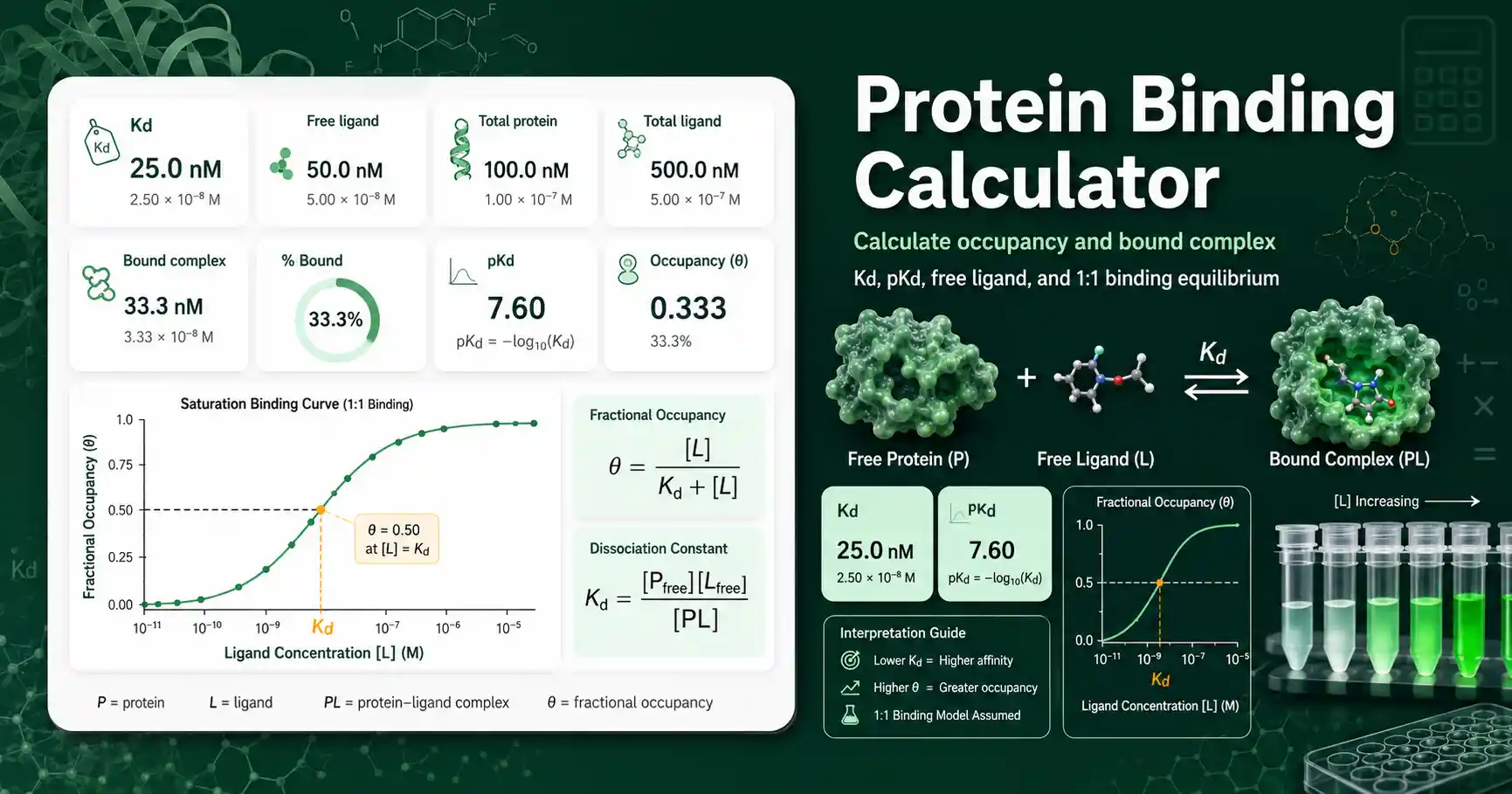
Protein Binding Calculator for Kd and occupancy
The Protein Binding Calculator estimates how much protein is bound by a ligand at equilibrium.
It is useful for protein-ligand binding, receptor-ligand binding, enzyme-inhibitor binding, and simple macromolecule binding examples.
The calculator accepts Kd and ligand concentration in M, mM, µM, or nM.
It reports fractional occupancy, percent protein bound, pKd, free ligand, and bound complex when the selected mode supports those values.
Students can use it to see why ligand concentration equal to Kd gives about 50% occupancy in the free-ligand model.
Teachers can use it to demonstrate how stronger affinity means a lower Kd and a higher pKd.
Lab workers can use it to make quick checks before designing a binding assay, fluorescence assay, pull-down experiment, or competition experiment.
Researchers can use it as a fast browser-based sanity check before fitting binding data in a full graphing or statistics package.
For response midpoint calculations, use an EC50 Calculator because EC50 depends on assay response and not only binding equilibrium.
Protein Binding Calculator formula and assumptions
The simple free-ligand formula is θ = [L] / (Kd + [L]), where θ is the fraction of protein binding sites occupied.
This formula assumes the free ligand concentration is known at equilibrium.
It works well when ligand is in large excess and binding does not significantly deplete ligand from solution.
In total amount mode, the calculator solves the 1:1 mass-balance equation Kd = [Pfree][Lfree] / [PL].
The bound complex is solved from total protein, total ligand, and Kd using a quadratic expression.
This matters when total protein is similar to ligand concentration or similar to the Kd value.
If total protein is 100 nM and ligand is 120 nM, ligand depletion can noticeably change the free ligand concentration.
If ligand is 100-fold higher than protein, the free ligand and total ligand values are usually much closer.
LibreTexts explains protein-ligand affinity and the use of Kd in simple binding equilibria: Protein-ligand binding and affinity.
Protein Binding Calculator result interpretation
Kd is the ligand concentration that gives half-maximal protein occupancy when free ligand is used in a simple 1:1 model.
A lower Kd usually means stronger apparent binding affinity.
A higher pKd also means stronger apparent binding because pKd is calculated as −log10(Kd in molar units).
If Kd is 10 nM and free ligand is 10 nM, the expected occupancy is about 50%.
If free ligand is 10 times Kd, the expected occupancy is about 91%.
If free ligand is one-tenth of Kd, the expected occupancy is about 9%.
The same concentration unit must be used consistently when comparing Kd, ligand, protein, and bound complex.
The calculator converts units internally to molar concentration so nM, µM, mM, and M can be mixed safely.
Use the Equilibrium Constant Calculator when you need to convert between association and dissociation equilibrium views.
Protein Binding Calculator worked example
Given values: Kd = 50 nM and free ligand concentration = 150 nM.
Formula: θ = [L] / (Kd + [L]).
Substitution: θ = 150 / (50 + 150).
Result: θ = 0.75, so protein occupancy is 75%.
Interpretation: the ligand concentration is three times Kd, so the protein is above half saturation but not fully saturated.
If you instead have total protein and total ligand concentrations, use total amount mode because the calculator must account for ligand consumed into the bound complex.
Protein Binding Calculator limitations
This calculator assumes a single independent binding site per protein molecule.
It does not model cooperative binding, multiple sites, allosteric transitions, nonspecific binding, or competition between ligands.
It also assumes equilibrium has been reached before the binding value is interpreted.
Slow association, slow dissociation, aggregation, adsorption to plastic, or active protein loss can make the apparent binding different from the calculated value.
Temperature, pH, salt concentration, cofactors, and buffer composition can change protein affinity.
Rounding matters most when Kd, total protein, and total ligand are all in the same concentration range.
Verify critical lab calculations independently before using them in real experiments.
User Queries About Protein Binding Calculator
What does the Protein Binding Calculator calculate?
It calculates how much protein is expected to be ligand-bound under a simple 1:1 equilibrium model.
When should I use total protein and total ligand mode?
Use total mode when protein concentration is not negligible compared with Kd or ligand concentration.
Does this calculator handle cooperative binding?
No. Cooperative systems need a Hill-style or multi-site binding model, not the one-site model used here.