
Trypan Blue Calculator for live and dead cell counts
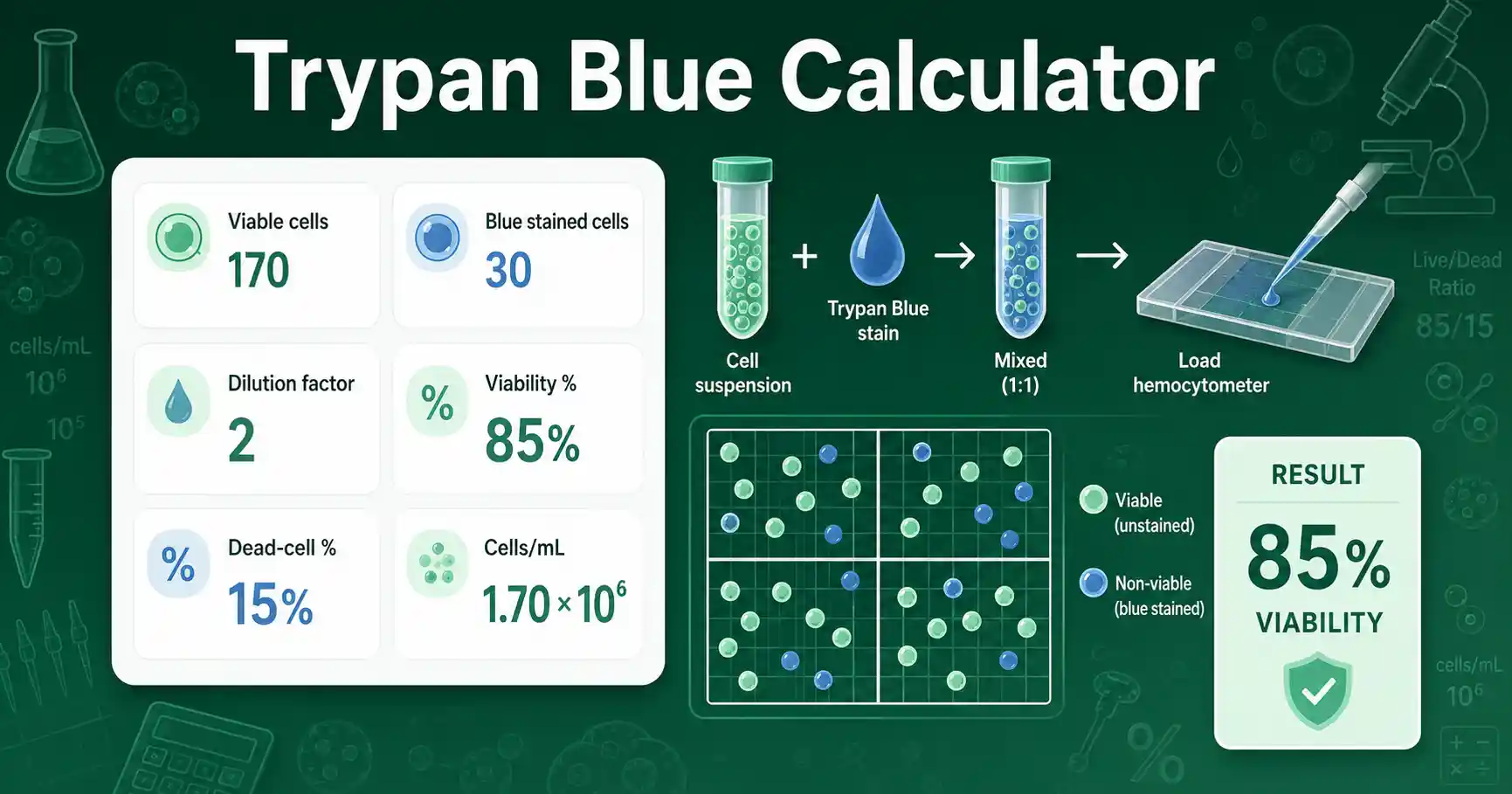
This Trypan Blue Calculator estimates viability from two visible count groups: unstained cells and blue stained cells. Unstained cells usually represent cells with intact membranes. Blue stained cells usually represent non-viable cells with compromised membranes. The tool reports viability percentage, dead-cell percentage, total counted cells, and the live-to-dead ratio.
The calculator is useful during cell culture lessons, routine passage planning, cryopreservation checks, and viability reporting in lab notebooks. Students can use it to learn how dye exclusion counts become percentages. Teachers can use it to demonstrate how the same raw counts lead to a clear biological interpretation. Lab workers can use it as a quick calculation check before moving to a Cell Seeding Calculator or another planning tool.
Trypan blue results depend on the counting method. A small sample, uneven mixing, clumped cells, or delayed counting can change the result. Treat the output as a calculation from the values entered, not as a guarantee that the biological sample is healthy.
How to use Trypan Blue Calculator correctly
Enter the number of viable cells as the unstained cell count. Enter the number of non-viable cells as the blue stained count. The calculator combines both groups to find the total counted cells. It then divides viable cells by total cells to find the viability percentage.
Use the dilution factor field when the count comes from a diluted stain mixture. A common 1:1 mix of cell suspension and trypan blue has a dilution factor of 2. The dilution factor does not change viability percentage when live and dead cells are counted from the same mixture. It does change cells/mL in advanced mode because the chamber count must be corrected back to the original cell suspension.
Advanced mode asks for the number of large hemocytometer squares counted and the chamber conversion factor. For a standard large square with a volume of 0.0001 mL, the common conversion factor is 10,000. If your chamber, counter, or counting rule uses another factor, enter that value instead. For a dedicated concentration workflow, compare this result with the Hemocytometer Calculator.
Trypan Blue Calculator formula and assumptions
The main formula is viability percentage = viable cells ÷ total cells × 100. Total cells means viable cells plus non-viable cells. The dead-cell percentage uses the same denominator and replaces viable cells with stained non-viable cells.
In advanced mode, viable cells/mL = average viable cells per large square × dilution factor × chamber factor. Average viable cells per large square equals viable counted cells divided by the number of large squares counted. Total cells/mL uses viable plus dead cells in the same concentration formula.
The method assumes the counted chamber area represents the cell suspension. It also assumes viable and non-viable cells were classified consistently. Thermo Fisher describes trypan blue exclusion as a dye method where live cells exclude the dye and dead cells take it up in viability counting workflows in its Trypan Blue Exclusion guide.
Trypan Blue Calculator worked example
Given values: viable unstained cells = 340, blue stained non-viable cells = 60, dilution factor = 2, and large squares counted = 4. The total counted cells are 340 + 60 = 400 cells.
Formula: viability percentage = viable cells ÷ total cells × 100. Substitution: 340 ÷ 400 × 100 = 85%. The dead-cell percentage is 60 ÷ 400 × 100 = 15%.
For concentration, average viable cells per large square = 340 ÷ 4 = 85. Using a chamber factor of 10,000, viable cells/mL = 85 × 2 × 10,000 = 1,700,000 cells/mL. The interpretation is that the counted suspension has 85% viability and about 1.7 × 10⁶ viable cells/mL under the stated counting assumptions.
Trypan Blue Calculator results explained
A high viability percentage means most counted cells excluded the dye. A low viability percentage means a larger fraction of counted cells took up the dye. A value near 100% can happen when very few stained cells are present, but it still needs enough total cells to be meaningful.
A very small total count gives a fragile percentage. For example, 9 viable cells and 1 dead cell gives 90%, but the sample size is only 10 cells. A larger count gives a more stable estimate. If counts vary strongly between squares, remix the suspension and check whether cells are settling or clumping.
Cells/mL is different from viability percentage. Viability tells you the live fraction. Cells/mL tells you the concentration of cells in the suspension. Many lab planning steps need both values because a dense but low-viability sample may not behave like a healthy dense sample.
Trypan Blue Calculator mistakes to avoid
Do not enter dead cells as total cells. The denominator should include both viable and non-viable cells. Do not use a dilution factor of 1 for a 1:1 trypan blue mixture if you are calculating concentration. A 1:1 mixture doubles the original sample volume, so the usual correction is 2.
Do not compare results from different counting rules without noting the rule. Edge cells, clumped cells, faintly stained cells, and debris can all affect the count. Keep the same inclusion rule across all squares. Record the dilution factor, number of squares, and chamber factor in the lab note.
Do not overstate precision. A calculator can return 85.23%, but the real count may not support that many meaningful digits. Round results sensibly. Verify critical lab calculations independently before using them in real experiments.
Trypan Blue Calculator use cases in lab work
One use case is checking a cell suspension before seeding a plate. A user can count viable and stained cells, calculate viability, and then use the viable cells/mL result to prepare a target seeding density. This helps avoid using total cells when the live-cell fraction is the value that matters.
Another use case is comparing cell handling conditions in a teaching lab. Students can calculate viability after gentle mixing and after rough handling, then discuss how membrane damage appears in the stained-cell count. The same calculation also helps compare fresh cultures, thawed cultures, and samples held at room temperature for different times.
Researchers and lab workers can use the tool to check arithmetic before entering values into a notebook, spreadsheet, or experimental plan. The tool does not replace local SOPs, validated counters, or safety rules. It simply converts the raw counted values into consistent percentages and concentration estimates.